A solar home energy monitor with no app and no subscription
A good home energy monitor for solar shows what your solar, your house, the grid and your battery are doing right now, without you opening an app. RayHub is a solar display for your wall that does this. It reads your inverter over your home WiFi, needs no app or account, has no subscription, and keeps your readings in your home.
Orders are open, and we ship from December 2026. Order your RayHub.
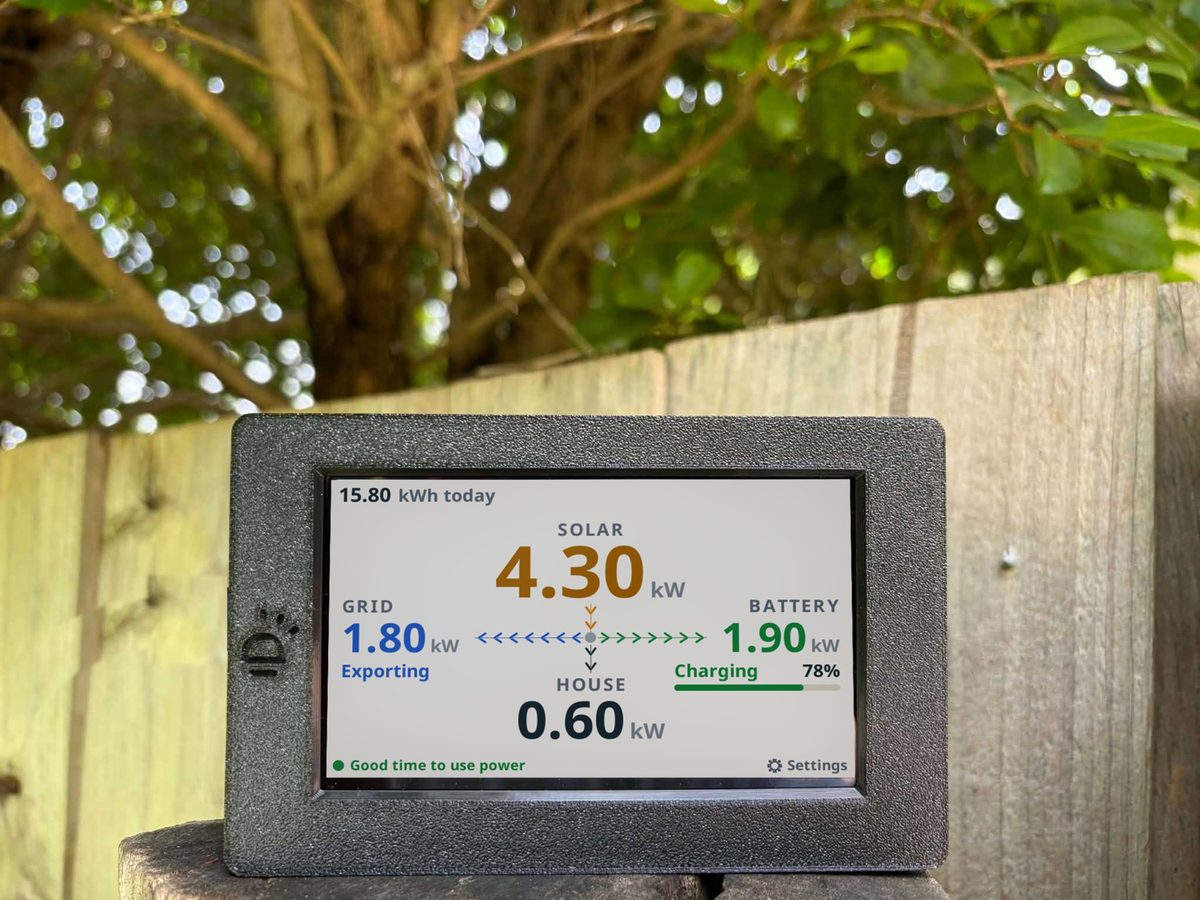
What a home energy monitor shows
| Solar | How much power your panels are making right now. For how that power moves through your home, see the solar power diagram. |
|---|---|
| House | How much power your home is using right now. |
| Grid | Whether you're sending power out or drawing it in. |
| Battery | Whether your battery is charging or discharging, and how full it is, if you have one. See what a battery does with your solar across a day. |
| Energy consumption | For energy consumption monitoring, the house figure is the one to watch. It is your home's use, live, next to what your solar is making and what the grid is doing. Your import and export totals show too, when your inverter provides them. For the kW on the display and the kWh on your bill, see kW vs kWh in plain words. |
What a solar display shows that a plain energy monitor does not
Some energy monitors measure one thing, such as the power your home uses. A solar display reads your inverter, so it can show the whole picture.
| Four readings at once | Solar, house, grid and battery power, together on one display, so you can see where your solar is going. |
|---|---|
| Read from your inverter | RayHub reads your inverter's own data over your home WiFi. Nothing is clipped on in your switchboard. |
| No app, no account | The numbers are on your wall, not behind a login. You set it up on its touch display or from your phone's browser. |
| A forecast | After it has learned your system over its first few good days, the display shows an estimate for tomorrow's solar. It is an estimate. |
| Free power hours | You can set the start and end of your free power hours, and the display shows a green FREE POWER banner when they start. See the Solar Sharer Offer. |
The usual options
Most homes with solar can pick from two kinds of monitor. See the ways to monitor your solar system side by side.
| Inverter apps | Many inverter brands offer their own app, which shows your system on your phone. You open the app to see your numbers. Most apps get them through the maker's servers, so when those servers are down the app has little to show. See why a solar display keeps going when your app is down. |
|---|---|
| Clamp-on monitors | These measure power with sensors that clip around the cables in your switchboard. Have a licensed electrician fit sensors inside your switchboard. |
RayHub, app-only monitoring and clamp-on monitors
Three ways to see your solar at home, side by side.
| RayHub | Reads your inverter over your home WiFi. Shows solar, house, grid and battery power live on a display on your wall. No app, no account and no subscription. |
|---|---|
| App-only monitoring | Shows your numbers in an app on your phone. You open the app to look, and most apps get the numbers through the maker's cloud. |
| Clamp-on monitors | Measure power with a sensor on the cables in your switchboard, so a licensed electrician fits it. Most come as a sensor unit plus an app. |
What RayHub does
A solar display for your wall that shows what your solar is doing right now.
| How it reads | It joins your home WiFi and reads your inverter over your home network. It asks your inverter for fresh readings every second. A few brands ask for a slower pace, and the display follows it. |
|---|---|
| What you see | Live power for your solar, your house, the grid and your battery. You also see today's solar, export and import totals when your inverter provides them. |
| No app | You set it up on its own touch display, or from your phone's browser. There's no app to install and no account to make. |
| No subscription | You buy the display once. There's no cloud service and no subscription. |
| Your data | Your live readings stay in your home, and the numbers keep going if your internet drops out. |
| Power | It plugs in with USB-C and runs from a USB power supply. There's no wiring to do and you don't need an electrician. |
Every reading comes from your inverter's own data, so accuracy follows your inverter.
On a plan with prices that change through the day, see how Amber Energy rates work.
Sigenergy, SolaX Hybrid Gen4, Sungrow, Fronius Primo, GoodWe hybrid and Victron are verified in a real home. Several more brands are built and tested in our workshop. See how to connect your inverter for the list, or the full specifications. Sigenergy owners can read the Sigenergy monitoring guide. Not sure if your home is single phase or three phase? Here is how to tell. New to reading your numbers? See what your solar does through the day. Wondering why RayHub reads the inverter? See DC vs AC and what your inverter does. Already have a smart meter? See what a smart meter shows and what it misses.
Questions
| What is a home energy monitor for solar? | A home energy monitor for solar shows what your solar, your house, the grid and your battery are doing right now. RayHub is a solar display for your wall that does this. It reads your inverter over your home WiFi. |
|---|---|
| Do I need a home energy monitor if I have an inverter app? | An app shows your numbers on your phone when you open it, and most apps get them through the maker's servers. A solar display shows them on your wall all day and reads your inverter over your home network. You can use both. |
| What does a solar monitor display show? | Live power for your solar, your house, the grid and your battery. It also shows today's solar, export and import totals when your inverter provides them. Every reading comes from your inverter's own data, so accuracy follows your inverter. |
| Do I need an app to use RayHub? | No. You set RayHub up on its own touch display, or from your phone's browser. There's no app to install and no account to make. |
| Does RayHub have a subscription? | No. You buy the display once. There's no cloud service and no subscription. |
| Does RayHub change how my solar system runs? | No. RayHub only reads your inverter. Nothing on the display changes how your solar system runs. |
| Does this solar energy monitor work with my inverter? | Sigenergy, SolaX Hybrid Gen4, Sungrow, Fronius Primo, GoodWe hybrid and Victron are verified in a real home. Several more brands are built and tested in our workshop and have not run in a real home yet. See how to connect your inverter for the list. |
| Do I need a battery to use RayHub? | No. RayHub shows your battery when you have one. Solis is the one exception, where our steps cover Solis hybrids that run a battery. Check how to connect your inverter for yours. |
| Not sure if RayHub will work with your system? | Email us at gday@rayhub.com.au with your inverter brand and model, and whether you have a battery. We'll tell you if RayHub supports it. |
| Does RayHub need an electrician to install? | No. It plugs in with USB-C and runs from a USB power supply. There's no wiring to do and you don't need an electrician. |
| How often does RayHub update? | It asks your inverter for fresh readings every second. A few brands ask for a slower pace, and the display follows it. SMA is updated every 10 seconds. |
| Does RayHub keep working if my internet drops? | Yes. Your live numbers keep going. The forecast and updates need the internet. |