Our first batch ships in December. Order your RayHub now!

Say g'day to RayHub.

Make hay while the sun shines.

Your solar, live on the wall. One glance from across the room tells you when the sun is covering your power.

No app, no account, no subscription. You buy it once and it plugs in and does its job.

Three sizes, from A$110.
Shipping from December 2026.

Built for 13 inverter brands. Sigenergy, SolaX Hybrid Gen4, Sungrow, Fronius Primo, GoodWe hybrid and Victron are verified in a real home. Check yours.

Illustration of RayHub showing your energy flow RayHub on a wall, its screen showing 25.60 kWh generated today and about 21 kWh expected tomorrow. Solar is making 4.00 kW. Your house is using 0.80 kW, your battery is 100 percent full and resting at 0.00 kW, and 3.20 kW is going to the grid. The status line reads Good time to use power. 25.57kWh today 25.58kWh today 25.59kWh today 25.60kWh today Tomorrow ~21 kWh SOLAR 4.00kW GRID 3.20kW Exporting BATTERY 0.00kW 100% HOUSE 0.80kW Good time to use power Settings
RayHub showing solar against the forecast Headed Solar vs forecast. A ring is most of the way round, with 25.6 kWh of solar today against a forecast of about 30 kWh. SOLAR VS FORECAST Tomorrow ~21 kWh 25.6 kWh of solar today Forecast ~30 kWh Good time to use power Settings
RayHub showing this week $8.29 spent this week and $10.02 earned. One bar a day for the last seven days, spent standing up in red and earned hanging down in green, today on the right. $8.29spent this week $10.02earned $2.00 $2.00 S S M T W T Today Good time to use power Settings
RayHub showing this month $27.77 spent in October and $33.23 earned. One bar a day for the last 31 days, the days before the 1st of October fainter, today on the right. $27.77spent in October $33.23earned $5.00 $5.00 23 Sep 1 Oct Today Good time to use power Settings
Four views on the 2.8 inch RayHub. Figures are examples.
  • See your solar at a glance

    Your solar, your home, the grid and your battery, live on the wall. You don't have to find your phone or open an app to check.

  • Use power while the sun is paying

    When your display shows you sending power to the grid, you have spare. That's a good time to run the dishwasher or the washing machine, or charge your car.

  • Order with confidence

    Every display has a 12-month warranty, and you can talk to us directly if you have any issues.

  • Real support, here in Australia

    Email us and we answer within two business days. Cody is a licensed electrician and solar installer. Ethan built the software. Between us we can help with anything you need.

Order your RayHub

  • RayHub 2.8 inch solar display

    2.8 inch

    For a bench or a shelf.

    A$110 including GST

  • RayHub 4.3 inch solar display

    4.3 inch

    For your kitchen or hallway.

    A$200 including GST

  • RayHub 7.0 inch solar display

    7.0 inch

    For your wall, where the whole family can see it.

    A$400 including GST

See what's in the box
  • Your RayHub display, fitted in its case. We print every case ourselves in Bellingen, in our solar-powered workshop.
  • A wall plate for hanging it, and a clip-on bench stand.
  • A USB-A to USB-C cable.
  • A quick-start card.
  • A mailing box made from 99.9% recycled paper. Recycle it or compost it.
  • No power adapter, to cut down on e-waste. A spare 5 V phone charger is all it needs.
  • Limited first run
  • Secure checkout
  • Ships from Bellingen NSW

Shipping is A$12 per order within Australia and A$20 to New Zealand. We start sending orders in December 2026.

Up to four displays per order, in any mix of sizes.

Not sure it works with your inverter? See the 13 brands, or email us your inverter brand and model at gday@rayhub.com.au and we'll tell you before you order.

Built for 13 inverter brands

Six brands are verified in a real home and several more are built and tested in our workshop. Your inverter needs one setting switched on, called Modbus. Some brands let you do it in their app, otherwise your installer can in a couple of minutes.

Not sure about yours? Email your inverter brand and model to gday@rayhub.com.au and we'll tell you before you order.

Verified in a real home

  • Sigenergy
  • SolaXHybrid Gen4
  • SungrowSH hybrids
  • FroniusPrimo
  • GoodWeHybrids
  • VictronCerbo GX

Built and workshop tested

  • SolarEdge
  • Deye / Sunsynk
  • AlphaESS
  • Fox ESS
  • Solis
  • SMA
  • Growatt

Not sure your setup will work? Email gday@rayhub.com.au and we'll work with you to get it up and running.

Up and running in minutes

You can do all of this yourself. An electrician or solar installer can do it too.

  1. Put it up near a power point

    Hang it on the wall on its small plate, or stand it on a bench on its clip-on stand. Plug in the USB cable from the box with your own 5 V USB power adapter, and it's on.

  2. Connect it to your WiFi

    Pick your WiFi and type its password right on the screen. You can also scan the QR code it shows and finish in your phone's browser. There's nothing to install and no account to make.

  3. It finds your inverter

    Give it your solar system's address from the connect guide and it works out the brand by itself, usually showing your numbers in under a minute.

Price spikes, free power hours, power cuts and storm warnings, right on your display

When something needs your attention, your display puts it in a banner across the top of the screen, where everyone in the house sees it.

On a plan with live wholesale prices, like Amber, a red banner shows the price per kWh when it spikes, so you can get ready to export your power. On a plan with free power hours, like the Solar Sharer Offer in NSW, South East Queensland and South Australia, a green banner shows what time they end. In a power cut, a red banner tells you your home is running off grid. When there is a storm warning for your area, an orange banner lets you know so you can get ready.

If your display can't reach your solar system, it says so the same day instead of on your next bill.

Illustration of RayHub's banners for a price spike, free power, a power cut and a storm warning RayHub's screen showing its four banners in turn. First a red banner reading PRICE SPIKE - $3.20 per kWh, with your battery sending 1.50 kW and solar 1.30 kW, so 1.90 kW goes to the grid while your house uses 0.90 kW. Your battery is 94 percent full. Then a green banner reading FREE until 2:30pm and tomorrow's forecast of about 21 kWh. Solar is making 5.10 kW and 0.70 kW of free power is coming from the grid. Your house is using 2.30 kW and your battery is charging at 3.50 kW and is 62 percent full. The readout shows 19.90 kWh of solar today. The status line reads Good time to use power. Then a red banner reading OFF GRID in a power cut, with the grid reading OFF while solar at 2.20 kW and your battery at 0.30 kW run your house at 2.50 kW. Then an orange banner reading STORM WARNING, with solar making 2.40 kW, your house using 1.10 kW, your battery charging at 0.10 kW and 1.20 kW going to the grid. PRICE SPIKE - $3.20 per kWh SOLAR 1.30kW GRID 1.90kW Exporting BATTERY 1.50kW Discharging 94% HOUSE 0.90kW 31.80 kWh today Settings FREE until 2:30pm Tomorrow ~21 kWh SOLAR 5.10kW GRID 0.70kW Importing BATTERY 3.50kW Charging 62% HOUSE 2.30kW 19.90 kWh today Good time to use power Settings OFF GRID SOLAR 2.20kW GRID OFF Power cut BATTERY 0.30kW Discharging 98% HOUSE 2.50kW 30.10 kWh today Settings STORM WARNING SOLAR 2.40kW GRID 1.20kW Exporting BATTERY 0.10kW Charging 99% HOUSE 1.10kW 27.30 kWh today Settings
Illustration of the price spike, free power, power cut and storm warning banners. Figures are examples.

See what your solar should make tomorrow

The corner of your display shows what tomorrow should make, like “Tomorrow ~21 kWh”, so you can plan the washing for a sunnier day. Tap the middle and a ring shows how today is going against the forecast.

It needs only your postcode. Over its first few sunny days your display learns what your system makes, with no panel specs to enter.

Illustration of RayHub showing solar against the forecast RayHub's screen after a tap in the middle, headed Solar vs forecast. A ring is most of the way round, with 25.6 kWh of solar today against a forecast of about 30 kWh. The corner shows about 21 kWh expected tomorrow. The status line reads Good time to use power. SOLAR VS FORECAST Tomorrow ~21 kWh 25.6 kWh of solar today Forecast ~30 kWh Good time to use power Settings
Illustration of the screen after a tap in the middle. Figures are examples.

Key features

  • See your export and import. Your display shows what you sent to the grid today and what you took from it, from your inverter's own readings. On most systems it's one tap on the kWh number.
  • Your rates and spend. Enter what you pay for power and what you get for feed-in, on your display or your phone. The same tap then shows what you spent and earned today.
  • Automatic updates. New features and fixes arrive by themselves.
  • Free power hours. Set your free hours on the hour or the half hour. A green "FREE POWER" banner shows across the top of the screen until they end, so you know when to run the dishwasher, the washing or the car charger.
  • Power cuts. If the grid drops out, a red "OFF GRID" banner shows, and your display keeps showing what your solar and battery are doing for as long as it and your router have power.
  • Your local weather and forecast. Once a day your display fetches the sunshine forecast for your postcode.
  • Dims at night. Set the hours on your display and it turns itself down overnight.
  • Price spikes. On a plan with live wholesale prices, like Amber, a banner warns you when the price spikes so you can prepare to export your power, and tells you when power is cheap.
  • Works without the internet. Your display reads your inverter on your home network, so your live numbers will keep going if your internet drops out and your unit is connected to your backup circuit. Your forecast and automatic update features require the internet to function correctly.

See your car charging on your display

If you have a Sigenergy DC charger, your display shows your car's charge level and how fast it is charging, verified in a real home. Charging from spare solar through other chargers is built and being tested. Have an EV charger? Tell us which one at gday@rayhub.com.au.

Illustration of RayHub with a car charging RayHub's screen with the car shown beside the house, a part that is in testing. Solar is making 2.74 kW. Your house is using 0.60 kW and your car, labelled EV, is charging at 1.84 kW with the words Charging at 8 A. Your battery is charging at 0.20 kW and is 99 percent full, and 0.10 kW is going to the grid. The top of the screen shows 28.70 kWh generated today and about 21 kWh expected tomorrow. 28.70kWh today Tomorrow ~21 kWh SOLAR 2.74kW GRID 0.10kW Exporting BATTERY 0.20kW Charging 99% HOUSE 0.60kW EV 1.84kW Charging at 8 A Settings
Illustration of the screen with a car charging. Figures are examples.

Who makes this

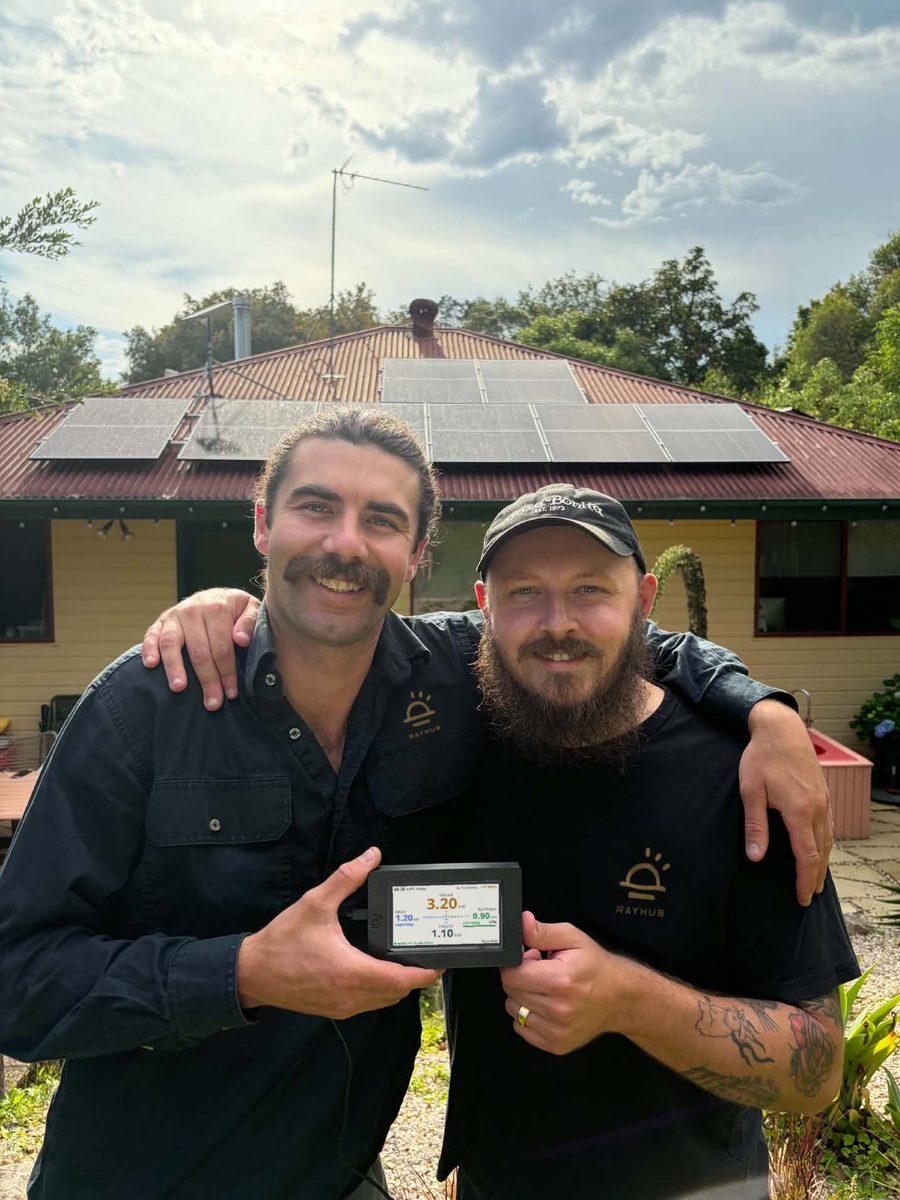
Cody and Ethan holding a RayHub display in front of a solar roof in Bellingen
Cody and Ethan in Bellingen.

RayHub is made by two of us in Bellingen, on the NSW Mid North Coast. Cody is a licensed electrician and solar installer and runs Fernmount Electrical. Ethan spent years making video games and now works building national fundraising events for charities. The first unit runs on Ethan's own home solar every day.

We're Australian owned, and when you need help, you'll be talking to one of us.

We're based in Bellingen, a shire that already runs its council buildings and streetlights on 100% renewable electricity.

We built it because solar apps let us down. Every brand has its own app, and some want an account and a cloud login just to show you your own numbers. We wanted the numbers on the wall, live, at a glance, with a nudge when there's spare power worth using.

Got a question, or just want to say g'day? Write to us at gday@rayhub.com.au.

Ready when you are. Order your RayHub.

Questions

Which size should I get?

The 2.8 inch suits a bench or shelf, the 4.3 inch a kitchen or hallway, the 7.0 inch a wall the whole family sees. Every size hangs on the wall or stands on a bench.

What comes in the box?

Your display in its case, a wall plate, a clip-on bench stand, a USB-A to USB-C cable and a quick-start card. It runs from your own 5 V phone charger.

When will it arrive?

We begin sending in December 2026 by tracked Australia Post.

Who installs it?

You can. Hang it on the wall or stand it on a bench near a power point, plug it in and follow the phone setup. Your inverter needs one setting switched on, which we walk you through.

Does it need the internet?

Your display and your inverter talk to each other inside your home, over your WiFi. Your live solar, battery and grid numbers keep working if your internet drops, as long as your WiFi router is still on. Your display uses the internet for your forecast, storm warnings, live prices, the clock and software updates. If your battery backs up some of your circuits in a power cut, we suggest having your WiFi router on one of them, so your display keeps working.

Where do the numbers come from?

From your inverter. Your display shows exactly what your inverter reports, the same data its own app uses.

My inverter isn't listed?

Email the model to gday@rayhub.com.au. The brands people ask for most get added first.

More questions are answered on the help page.

Pick the size that suits your wall, and we send it in December.

Order your RayHub